
IMPORT command
Imports the geometry from external files into the current drawing.

Icon: 
Alias: IMP
Description
Opens the Import file dialog box to select a supported file type to import into the current drawing.
- Supported import file formats available with BricsCAD Lite and above:
-
- Drawing Exchange Format (*.dxf;*.dwg)
- Windows Metafile Formats (*.wmf;*.emf;*.wmz;*.emz)(1) (2)
- Collada (*.dae)
- MicroStation DGN File (*.dgn)
- Wavefront Object file (*.obj)
- Supported import file formats available with BricsCAD Pro and above:
-
- SketchUp file (*.skp)(1)Note: The Trimble SketchUp files are imported as subdivision meshes (entities are imported as named blocks, render material definitions and the material mappings are imported on the meshes). The CONVTOSOLID and CONVTOMESH commands provide easy conversion between meshes and solids.
- Scalable Vector Graphics (*.svg)
- Rhino file (*.3dm)(1) (2)
- SketchUp file (*.skp)(1)
- Supported import file formats available with BricsCAD BIM and BricsCAD Ultimate:
-
- IFC file (*.ifc;*.ifczip)
The IFC Import Settings dialog box opens after selecting the IFC file.
Important:- IFC4x1 is not an official version. While we support importing IFC4x1 files, the code is not actively maintained, and we advise using other IFC versions.
-
IFC4x3 import does not yet support some new geometry types, including alignment segments.
- Revit Family (*.rfa)
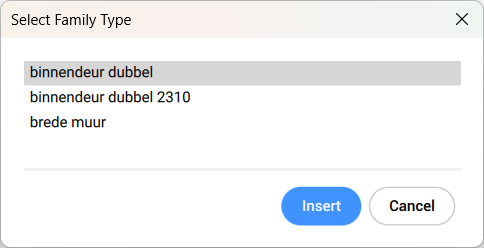
When a Revit® family contains multiple types, the Select Family Type dialog box displays to import the preferred type of the Revit® family. The RFA files attributes are also imported.
- Revit Project (*.rvt)
- IFC file (*.ifc;*.ifczip)
(1) Not available in BricsCAD for Linux.
(2) Not available in BricsCAD for macOS.
- BricsCAD currently supports the import of Revit 2015-2025 files only. If you would like to import a model created in a later version of Revit®, please consider importing the model into BricsCAD as an IFC file.
- More 3D format files are available through a separate module, Communicator for BricsCAD. You can download it from the Bricsys website.
The import and export procedures using Communicator for BricsCAD are controlled through a series of user preferences. See the Communicator section in the Settings dialog box.
- If the imported assembly has physical materials assigned to its parts, the materials can be imported together with the assembly structure. For each material in the imported file, a corresponding material is created in the target document material library, and its name, density, specific heat, and thermal conductivity are copied from the source material. If the imported file contains several materials with the same name, the first one is used. If the document already has a material with the same name in its material library, this material is used instead.
Materials copied to the document material library are not erased with Undo operations.
- The IMPORT command supports components architecture based on regular blocks.