
SuperHatch dialog box
Opens via: SUPERHATCH command (Express Tools)
The SuperHatch dialog box allows you to hatch entities using a selected image, block, external reference or wipeout entity.
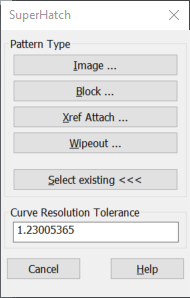
Image...
Opens the Select Image File dialog box to specify an image as superhatch pattern.
Block...
Opens the SuperHatch - Insert dialog box that allows you to select a block reference as superhatch pattern.
Xref Attach...
Opens the Select Reference File dialog box to specify an xref file as superhatch pattern.
Wipeout...
Creates a wipeout inside a superhatch pattern.
Select Existing <<<
Allows you to select an existing image, block, external reference, or wipeout entity as superhatch pattern.
Curve Resolution Tolerance
Used in case of curved boundaries, it allows you to specify the resolution tolerance for vector approximation of curved superhatch boundaries (maximum distance between the midpoint of any given hatch segment and the curved boundary).